从 Figma 导入图标
此函数属于 Iconify Tools 中的 导入函数 的一部分。
函数 importFromFigma() 用于从 Figma 文件中导入 SVG 文件。
它会创建一个 IconSet 实例,该实例可导出为多种格式。
要求
要导入 Figma 文件,你需要具备:
- Figma 文件 ID。请参阅如何获取 Figma 文件 ID 一文。
- 文档的访问权限。
- Figma API 访问令牌。请参阅如何获取 Figma API 访问令牌 一文。
限制
导入函数对 Figma 文档结构有以下几点限制:
图标必须是以下 Figma 节点类型之一:
- Frame
- Component
- 组件实例
父图层只能是以下 Figma 节点类型:
- Page(在某些 Figma 文档中称为 Canvas)
- Frame
- Group
图标不能是:
- 放置在组件或组件实例内部
- 没有 Frame 或 Component 容器的形状
图标不能包含:
- 位图
- 文本。请将文本转换为轮廓
用法
该函数包含以下参数:
- options,object。配置选项。
函数返回:
- 成功时返回 FigmaImportResult 对象。
- 如果自上次运行以来文件未被修改,则返回 "not_modified" 字符串(仅在设置了 ifModifiedSince 选项时才会返回)。
如果发生错误,导入过程可能会抛出异常,你可以使用 try 和 catch 进行捕获。
该函数是异步的。这意味着你需要将其作为 Promise 实例进行处理,通常是在函数调用前添加 await。
选项
选项对象包含许多属性,其中大多数不是必需的。
在导入过程的所有部分中都必须使用的必需选项包括:
- file,string。Figma 文件 ID。请参阅如何获取 Figma 文件 ID 一文。
- token,string。Figma API 访问令牌。请参阅如何获取 Figma API 访问令牌 一文。
遍历文档时使用的必需选项:
- iconNameForNode,function。用于检查节点是否为图标的回调函数。
生成图标集时使用的必需选项:
- prefix,string。导入图标集的前缀。在导出为 IconifyJSON 时,会在 IconSet 实例中使用。
其他选项分为以下几组:
缓存选项
这些选项用于缓存数据:
- cacheDir,string。缓存存储目录。使用它可以避免每次运行脚本时都重新获取相同的文件。
- cacheAPITTL,string。API 查询缓存的 TTL(生存时间),单位为秒。仅在设置了 cacheDir 时生效,默认值为 3 天。
- cacheSVGTTL,string。SVG 缓存的 TTL(生存时间),单位为秒。仅在设置了 cacheDir 时生效,默认值为 30 天。
如果你预计会多次运行脚本,建议缓存 API 响应以避免重复获取相同数据。请将 cacheDir 设置为一个可写目录。
TTL 选项通常无需更改默认值。每个 SVG 都有唯一的链接,因此如果图标发生变化,它将生成新的缓存文件,所以图标的 TTL 可以设置得较高。
如果设置了缓存选项,还建议将 ifModifiedSince 选项设置为 true。这将指示导入函数绕过缓存,从 Figma 获取文档的浅拷贝,然后比较 Figma 中的文档自上次缓存以来是否已更新。如果文档已更新,函数将清除缓存。
const options = {
    // ... 其他选项在此处
    cacheDir: 'cache/api',
    ifModifiedSince: true,
 };
获取 Figma 文档的选项
这些选项在获取文档时使用:
- version,string。文档版本。设置此项以解析文档的特定版本。
- ifModifiedSince,string|Date|true。如果设置,函数将检查文档是否已更新。
ifModifiedSince
当你希望仅在图标集已更新时才获取数据时,使用 ifModifiedSince 选项。
值可以是以下之一:
- 最后修改时间,格式为 string。你可以从解析结果的 lastModified 属性中获取。
- 最后修改时间,格式为 Date。
- true。这是一个特殊值,它会将时间与缓存数据中存储的时间进行比较(参见上方的 cacheDir 选项)。
如果 Figma 文档未被修改,函数将返回字符串 "not_modified"。
如果未设置此选项,函数将无法返回 "not_modified"。
在 Figma 文档中查找图标的选项
该函数无法可靠地检测哪个元素是图标,哪个不是。
这些选项用于告知函数在何处查找图标:
- ids,string[]。要检查的节点 ID 数组。如果你了解文档结构并希望将 Figma API 查询限制在特定节点,此选项非常有用。
- depth,number。从 API 检索的节点树深度。见下文。
- pages,string[]。应检查图标的页面名称列表。
- filterParentNode,function。用于过滤父节点的回调函数。可作为 pages 属性的替代方案,但还会检查子节点(如 Frame 和 Group)。
- iconNameForNode,function。必需。用于检查节点是否为图标的回调函数。
depth
depth 选项用于告知函数应扫描 Figma 文档的深度。扫描大型文档会导致解析变慢,因此建议设置此选项。
该值表示到达图标所需的层数。
例如,如果图标直接放置在页面上且没有父级 Group,则深度值为 2。
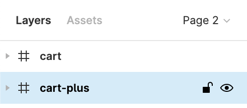
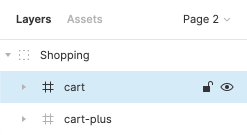
如果图标按以下树状结构放置:
- Page。
- 容器 Frame 或 Group。
- 图标 Frame、Component 或组件实例。
则深度值为 3。
pages
pages 选项用于告知函数 Figma 文档的哪些页面包含图标。值为页面标题列表。
示例:
const options = {
    // ... 其他选项在此处
    pages: ['Icons'],
 };
如果设置了 pages 选项,则 filterParentNode 选项将被忽略。
filterParentNode
filterParentNode 选项是一个用于过滤潜在父节点的回调函数。
如果可能,应使用它来过滤父节点,否则解析器可能会意外找到并导出符合图标条件但位于你已遗忘的错误页面上的节点。
它是 pages 选项的替代方案。如果设置了 pages 选项,则此选项将被忽略。
回调函数包含以下参数:
- node,FigmaParentNodeData。要检查的节点。
- document 是 Figma API 返回的 Figma 文档结构。由于目前 Figma 未提供 API 响应的类型定义,因此文档的 TypeScript 接口功能有限。
回调函数应返回:
- 如果节点是有效的父节点,则返回 true。
- 如果节点应被忽略,则返回 false。
回调函数可以是异步的。
示例:
const options = {
    // ... 其他选项在此处

    // 3 个层级:页面 'Icons' -> 画框 'Regular' -> 图标
    depth: 3,

    // 仅从 'Icons' -> 'Regular' 导入图标
    filterParentNode: (nodes) => {
        switch (nodes.length) {
            case 1: {
                // 页面:'Icons'
                const node = nodes[0];
                return node.name === 'Icons';
            }

            case 2: {
                // 画框:'Regular'
                const node = nodes[1];
                return node.name === 'Regular';
            }
        }
        return false;
    },
 };
iconNameForNode
iconNameForNode 选项是一个用于检查节点是否为图标的回调函数。
函数应返回:
- 如果应从该节点导出图标,则返回 string 类型的图标名称。在将图标添加到 IconSet 实例时会使用该名称。
- 如果节点不是有效的图标,则返回 null。
回调参数包括:
- node,FigmaImportNodeData。节点的相关信息。
- nodes 是一个对象,包含节点数量以及回调函数已标记为图标的节点列表。
- document 是 Figma API 返回的 Figma 文档结构。由于目前 Figma 未提供 API 响应的类型定义,因此文档的 TypeScript 接口功能有限。
回调示例:
const options = {
    // ... 其他选项在此处
    iconNameForNode: (node) => {
        if (
            // 图标存储在 2 个父级之后:页面 -> 容器画框 -> 图标
            node.parents.length !== 2 ||
            // 图标使用画框
            node.type !== 'FRAME' ||
            // 图标尺寸应为 32x32
            node.width !== 32 ||
            node.height !== 32
        ) {
            return null;
        }

        // 返回节点名称作为图标的关键字
        return node.name;
    },
 };
回调函数可以是异步的。
生成 SVG 的选项
这些选项与从 Figma 导出 SVG 时的导出设置完全相同:
- includeID,boolean。设置为 true 可为所有 SVG 元素包含 id 属性(默认禁用)。
- simplifyStroke,boolean。简化内部/外部描边,并在可能的情况下使用描边属性代替 <mask>(默认启用)。
- useAbsoluteBounds,boolean。无论节点是否被裁剪或周围空间是否为空,都使用节点的完整尺寸。使用此选项可在不裁剪的情况下导出文本节点(默认禁用)。
导入图标的选项
该函数将图标导入到 IconSet 实例中。这些选项用于自定义导入过程:
- prefix,string。必需。图标集的前缀。在导出为 IconifyJSON 时,会在 IconSet 实例中使用。
- beforeImportingIcon,function。在导入每个图标之前调用的回调函数。
- afterImportingIcon,function。在导入每个图标之后调用的回调函数。
这两个回调函数完全相同,唯一的区别是一个在导入图标前调用,另一个在导入图标后调用。
回调函数包含以下参数:
- item,FigmaIconNode。即将被导入或已导入的项。在 beforeImportingIcon 回调中,你可以修改其内容。
- iconSet,IconSet。图标集实例。
回调函数无需返回任何内容。
回调函数可以是异步的。
示例
以下示例从 Figma 导入简单的图标集,其中所有图标的颜色均为 "#2e4454",然后将颜色替换为 "currentColor"。
import { importFromFigma, parseColors } from '@iconify/tools';

/**
 * Important: set 'token' option before running this code. Token is mandatory.
 *
 * You can get your API token from Figma account page. Do not share your API token with anyone!
 */

// Cache directory. Used to avoid retrieving same files multiple times.
const cacheDir = 'cache/quill';

 (async () => {
    const result = await importFromFigma({
        // Icon set prefix, used for creating icon set instance.
        prefix: 'quill',

        // Community link: https://www.figma.com/community/file/1034432054377533052/Quill-Iconset
        // Community link does not have document ID and cannot be used. To parse a community file,
        // either copy link from file (if you are author) or duplicate it.

        // Figma document. Get document id by clicking "Share" button when editing it,
        // click "Copy link" and get id from link.
        file: '9lvc7JGhqpNnpF3OK9kjnG',

        // Figma API token. You can get it from your Figma account settings.
        token: '', // process.env.FIGMA_API_TOKEN,

        // If enabled, will stop import process if Figma document has not been updated since last parse.
        // ifModifiedSince: true,

        // Directory for cache
        cacheDir,

        // Depth of layers tree where icons are located.
        // 2 = page -> icon
        // 3 = page -> frame/group -> icon
        depth: 3,

        // Function to filter parent layers. Used to avoid scanning pages and nodes
        // that do not contain icons for export.
        filterParentNode: (nodes) => {
            switch (nodes.length) {
                case 1: {
                    // Page: 'Icons'
                    const node = nodes[0];
                    return node.name === 'Icons';
                }

                case 2: {
                    // Frame: 'Regular'
                    const node = nodes[1];
                    return node.name === 'Regular';
                }
            }
            return false;
        },

        // Check if node is an icon. Returns icon name on success, null on failure.
        iconNameForNode: (node) => {
            if (
                // Icons are stored after 2 parents: page -> container frame -> icon
                node.parents.length !== 2 ||
                // Icons use frames
                node.type !== 'FRAME' ||
                // Icon should be 32x32
                node.width !== 32 ||
                node.height !== 32
            ) {
                return null;
            }

            // Return node name as keyword for icon
            return node.name;
        },
    });

    /*
    // 'not_modified' can be returned only if 'ifModifiedSince' option was set, so uncomment ifModifiedSince option
    // and this code, otherwise TypeScript will complain that result cannot be 'not_modified'
    if (result === 'not_modified') {
        // This result is possible if ifModifiedSince option is set
        console.log('Not modified');
        return;
    }
    */

    const iconSet = result.iconSet;

    // Check colors in icons
    iconSet.forEachSync((name) => {
        const svg = iconSet.toSVG(name);
        if (!svg) {
            return;
        }

        parseColors(svg, {
            // Change default color to 'currentColor'
            defaultColor: 'currentColor',

            // Callback to parse each color
            callback: (attr, colorStr) => {
                switch (colorStr.toLowerCase()) {
                    case '#2e4454':
                        // Change to currentColor
                        return 'currentColor';

                    case 'none':
                        return colorStr;
                }

                // Should not happen
                console.error(`Unexpected ${attr} "${colorStr}" in ${name}`);
                return colorStr;
            },
        });

        // Update icon in icon set
        iconSet.fromSVG(name, svg);
    });

    // Export icon set in IconifyJSON format
    console.log(iconSet.export());
    console.log('Found', iconSet.count(), 'icons');
 })();